

Canton Becker

Jump to content.

Help for “bablooO” hacked / attacked WordPress Sites

WordpressHopefully, this information will be of use to some people out there who are unlucky enough to be hit by the “bablooO” wordpress security exploit. I believe this hack can impact anyone using WordPress version 2.8.0 and earlier. See this recent advisory, which I believe is related.

If you do a ‘view source’ on your WordPress blog and you see a bunch of spammy links  beginning with the comment code:
<!-- bablooO-start -->
…then here are some tips for how to recover from this problem:

  • Make sure your theme is okay. If you have a backup of your theme, restore your theme from backup as your theme files themselves may have been molested. In this particular exploit, footer.php may have been rewritten.
  • Don’t trust your WordPress installation. The actual core files may include injection code / backdoors. (wp-blog-header.php for example may have an obfuscated ob_start();eval(base64_decode()) call in it. The safest thing to do is:
  1. backup your wp-content directory and your WordPress database
  2. wipe out your entire installation
  3. reinstall the latest version WordPress from scratch
  4. restore your wp-content directory and database, and then examine both for any suspicious content. Here are some critical tips on how to search your wp-content directory for “backdoors”.
  • Make sure your database is okay (posts/pages). One tip I read about here is to use the export function (under the WordPress admin Tools menu) to save a giant XML file of all your posts/pages/comments to disk, and then you can use a text editor to search for strings like ‘viagra’ and ‘casino’ — two words which probably do not appear on your own blog, but are very likely to appear in the hidden content of these spammy links. You will have to fix these by hand.
  • Password-protect your admin directory using the .htaccess method to protect yourself from similar future exploits.

Related discussions:

http://ckon.wordpress.com/2009/06/05/bablooo-spammer-attack-on-several-wp-blogs/

http://wordpress.org/support/topic/280748

http://milw0rm.com/exploits/9110


How to remove ‘Web Hosting Provided by Bluehost.com’ WordPress footer

The Culprit

The Culprit

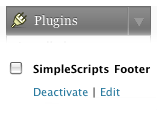
Recently bluehost made an update to their “SimpleScripts” installer so that when you install WordPress, no matter what theme you’re using, your site gets a “Web Hosting Provided by Bluehost.com” footer advertisement.

This can be pretty aggravating at first, especially since it seems like the only way to remove the promotional message is by commenting out the wp_footer() call in your theme. (Bad idea, will break some plugins.)

Fortunately, the fix is pretty easy once you know where to look:

  1. Go into your WordPress admin page
  2. Click plugins from the sidebar
  3. Deactivate “SimpleScripts Footer

Shame on BlueHost for (a) forcing its clients to switch to SimpleScripts by not providing WP updates via Fantastico anymore, and (b) automatically installing and activating a plugin that ads a promotional message on the websites of paying customers.