
Canton Becker

Jump to content.

canton@gmail.com
65 Cibola Circle
Santa Fe, NM 87505
T: (505) 216-5049
C: (505) 570-0635

Testimonial

Client Photo

"I would not hesitate to recommend Canton for web design and development. He's been the one I've turned to for years when it came time to get sites built for my own business. Canton is sharp and asks thoughtful questions that others may ignore or not oven think to ask. He produces excellent quality work, combined with a desire to truly help create the best product possible. It has been a pleasure working with such a talented developer."

- Donovan Watts
User Experience Researcher
AnswerLab

More testimonials

Website for Green Psychology

This website was designed for Jake and Hannah Eagle, co-founders of Green Psychology™. The content management system for this site is based on WordPress so that the client can easily update web pages, articles, and hosted discussions.

www.GreenPsychology.net

www.GreenPsychology.net


How to search for ‘backdoors’ in a hacked WordPress site

WordpressIf your WordPress site has been hacked, then you’ve probably already been advised to:

  1. Backup your WordPress database and wp-content directory
  2. Reinstall WordPress from scratch (the latest version, of course)
  3. Restore your database and wp-content directory

Next, you need to make sure there are no ‘backdoors’ installed in your wp-content directory. Here are a couple of tips. They all require that you have shell (SSH) access to your server, and at least a little familiarity with the command line.

If a backdoor has been installed on your site, it is almost certainly located in your wp-content directory. The reasoning behind this is that once you discover that your site has been hacked, you will most likely wipe out every single file on your server except for your wp-content directory, where your uploads, plugins, and themes are installed.

Begin your investigation by logging into your website via SSH and changing to your wp-content directory:
cd ~/public_html/wp-content
Here’s what to do next:

1. Search wp-content for every instance of an ‘eval’ command

grep -R eval * | more
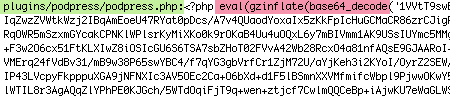
A number of plugins have legitimate uses of the eval command but if you see anything like this (especially at the very top of a .php file) OR if you see an eval anywhere in your uploads or themes directories, then you should be suspicious. And if the contents of the eval command are hidden inside of a base64_decode and/or gzinflate command like you see in the example below, then you’re definitely looking at a backdoor.

Actual example of backdoor hack inserted into the PodPress plugin

Actual example of backdoor hack inserted into the PodPress plugin

Really, the best thing to do regarding plugins is to delete your plugins directory, and reinstall your plugins from scratch.

2. Search the uploads directory for any .php files

find uploads -name "*.php" -print
There is absolutely no reason for a .php file to be living in your uploads directory. Delete any you find.

.php files should not be in your uploads directory

.php files should not be in your uploads directory

3. Delete any inactive themes

Backdoors may have been installed in your unused themes so delete those, including the wordpress ‘default’ and ‘classic’ themes.

If you have a local copy of your theme, delete your themes directory altogether and re-upload your theme anew.

4. Investigate all recently modified files

While it’s possible to fake the modification time of files, many hackers won’t bother. What this means is that many backdoor exploits will have a timestamp that sets them apart from your regular files. In most cases, I advise running the following command from your html root directory (usually “public_html” or “www”):

find . -mtime -10 -print

Replace 10 with however many days you want to look back. I advise going back at least 14 days beyond when you are certain your site was hacked, since a vulnerable site may be compromised multiple times in the same time period.

What you are looking for is any files that you don’t remember uploading or updating (e.g. the footer.php file in your theme) or anything like what is described above (e.g. a PHP file living in your wp-content/uploads directory, or your wp-config.php file, where exploits are often inserted).

5. Scan your WordPress database for exploits and spam

Exploits such as rogue PHP functions and  new administrative accounts may live in your database, as well as spam (e.g. hidden ads for pharmaceuticals). If you’re not experienced with digging through your SQL tables with a tool like phpMyAdmin, then you will have to rely on plugins like this one.


Tutorial: How to wrap text around an image in Photoshop (Video)

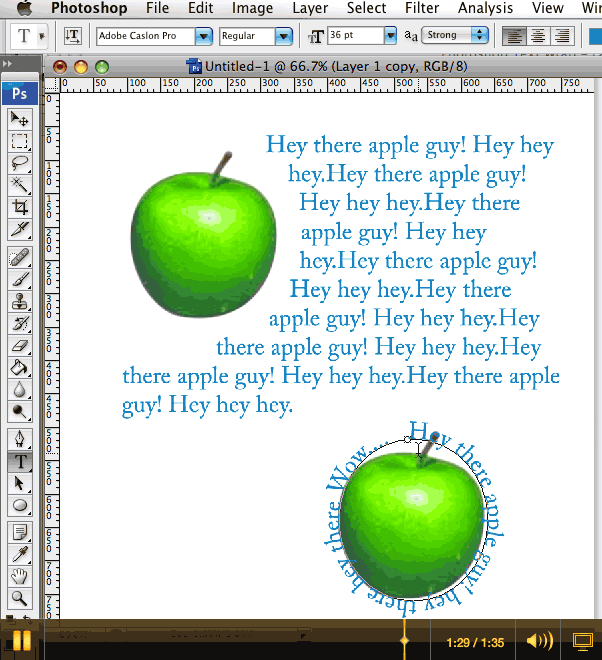
Wrapping text around objects

Wrapping text around objects

I just recorded a quick screencast video tutorial for a colleague on how to use paths or shapes to wrap text to avoid objects or circumscribe shapes (circles, etc.) using Photoshop. This is something more often done in Illustrator, but PS does the job pretty well too.

When mocking up websites in Photoshop, this is a great way to illustrate how text will flow around an inline image.

Click here to watch the tutorial.
(1 min 35 sec)